Integrations
WebEx
The WebEx integration enables synchronisation of WebEx meetings with face-to-face events as well as automatic attendance marking.
The WebEx integration enables synchronisation of WebEx meetings with face-to-face events as well as automatic attendance marking. This integration eases the administrative burden of virtual instructor-led events by managing the scheduling of video conference meetings for you.
The integration comes with the following capabilities:
- Meeting Synchronisation
- New sessions will automatically schedule a new WebEx meeting for the session date and time.
- Updating session date/times will reschedule the WebEx meeting to match the session.
- Deleting a session will cancel the scheduled WebEx meeting.
- Attendance Marking
- Meeting attendees will be automatically linked to ClearXP users if their email address matches.
- Attendee analytics is collected and record when they join and leave the meeting.
- If attendees are present for more than a pre-defined threshold of the session length, they will be automatically marked as attended.
- Meeting Recordings
- Scheduled WebEx meetings that are recorded will import all recordings into ClearXP and attach them to the session for later reference.
Meeting Synchronisation
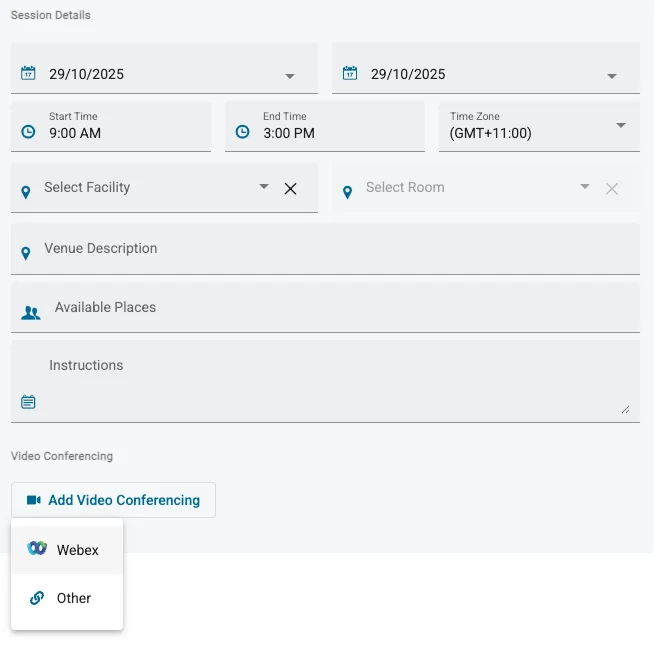
Section titled “Meeting Synchronisation”When scheduling a face-to-face Session and the WebEx integration is enabled, the Add Video Conferencing button will include a new “Webex” option.
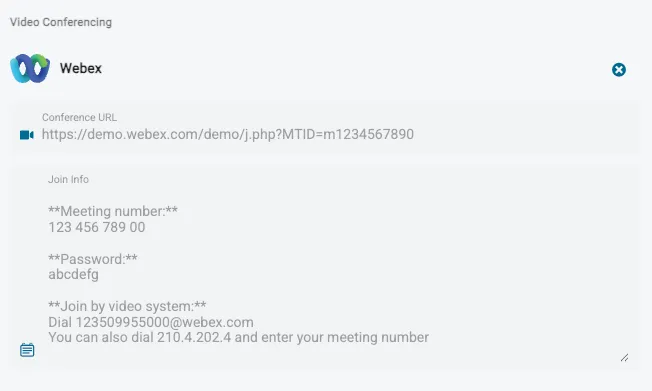
When saving the session, the WebEx integration will automatically schedule a WebEx meeting for the same date and time and attach the conferencing URL and join information to the session:
When launching the session view in ClearXP, the WebEx details will be shown and include a direct button to access the WebEx meeting.

Attendance Marking
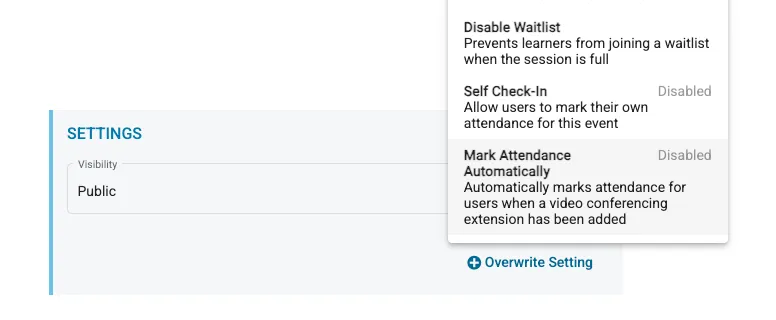
Section titled “Attendance Marking”After creating a session, the Mark Attendance Automatically setting can be used to enable attendance marking for meeting attendees.