
Product Releases
2025
In 2025 we achieved SOC 2 Type 2 certification and launched a completely redesigned Admin experience. We overhauled the Report Builder with new templates and built-in visualisations, introduced semantic content search, and continued enhancing the Data Explorer and assessment analytics.
2025/12/31
Section titled “2025/12/31”Enhancements
Section titled “Enhancements”Authoring
Our new storyboard authoring experience continued to mature this month:
- Added a review mode and full version history for storyboard content, making collaborative authoring safer and easier to track.
- You can now export a storyboard straight to PowerPoint.
- The AI Program Generator can now automatically enrol learners, alongside a range of UX refinements.
Reporting
- You can now report on leaderboards as well as task assignments and status.
- Data feeds now support compression, Excel and relative date options.
- You can now bulk import completion data via scheduled email (useful for third-party integrations).
Events
- Calendar RSVP tracking now tracks who has accepted or declined face-to-face invites. This tracking feeds into our xAPI data for analytics reporting.
Dashboards
- Added a new Pending status across Program Owner dashboards and Learning Hub tiles that represents when an activity is awaiting manager sign-off.
- Fixed Excel export not appearing in new Report Builder.
- Improved our calendar integration to better handle Microsoft Outlook responses and events with multiple attendees.
- Fixed a crash that could occur when exporting a report without a specified format.
- Fixed a conflict that could break the notification editor.
- Fixed validation of the email CSV import profile action.
2025/11/27
Section titled “2025/11/27”
Launch Day
Section titled “Launch Day”Introducing the ClearXP Program Generator (watch the in-person launch event above).
We’ve always placed a heavy focus on reporting and proving the effectives of learning. After talking to customers, we disovered they usually only cared about this for specific, high-value learning programs – and that these programs were the things that were hard to deliver!
We realised we couldn’t help maximise learning impact if we didn’t help customers create those impactful programs. So we designed an AI-pwoered Program Generator that takes your organisational goals and constraints and builds a tailored learning progresm to your needs.
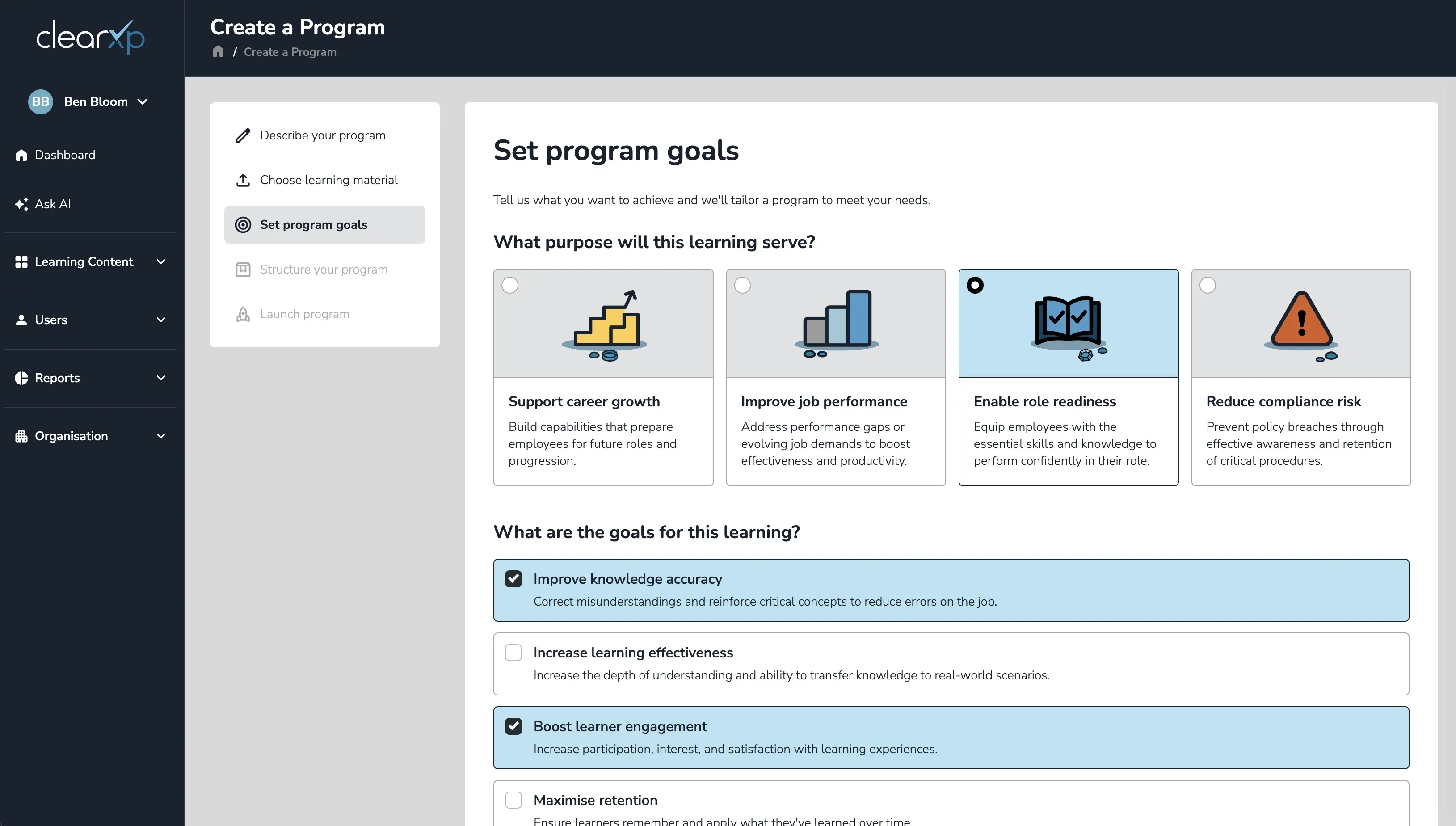
Enhancements
Section titled “Enhancements”Program Generator
- Generate a complete program from a prompt
Describe your learning outcomes (or just the program in plain language) and ClearXP drafts an end-to-end learning program in minutes. - Bring your own material
Select or upload reference content (policies, procedures, SME questionnaires, existing modules) and ClearXP extracts only what aligns with your outcomes, or generates from its own knowledge base when a gap exists. - Tailored by purpose and goals
Set a Learning Purpose and pick 2–3 Program Goals so ClearXP optimises the delivery mode, structure and content to your needs. - Powered by dozens of learning mechanics
Automatically applies the right mechanics for your goals, from adaptive learning and spaced repetition to gamification, campaigns and 180/360 assessments. - Fully editable
Review and refine the generated structure by adding, reordering or removing Learning Blocks and modules, with sequential or unlocked prerequisites. - Launch anywhere
Share programs directly to learners, or download to SCORM to deliver through your existing LMS.
Reporting
- PowerBI Reports can now be manually refreshed ahead of time.
- Added an option to disable heuristic re-completion tracking.
Admin
- Cross-realm publishing now copies across labels and resources.
- Introduced new statuses for activities and enrolments, surfaced throughout the Admin and Learning Hub.
- Enabled UTF-8 encoding on CSV exports so special characters are handled correctly.
- Fixed scheduled reports timing out.
- Upgraded the Coursera integration to align with latest API and authentication changes.
- Fixed earned badge statements failing due to an invalid attachment format.
2025/10/21
Section titled “2025/10/21”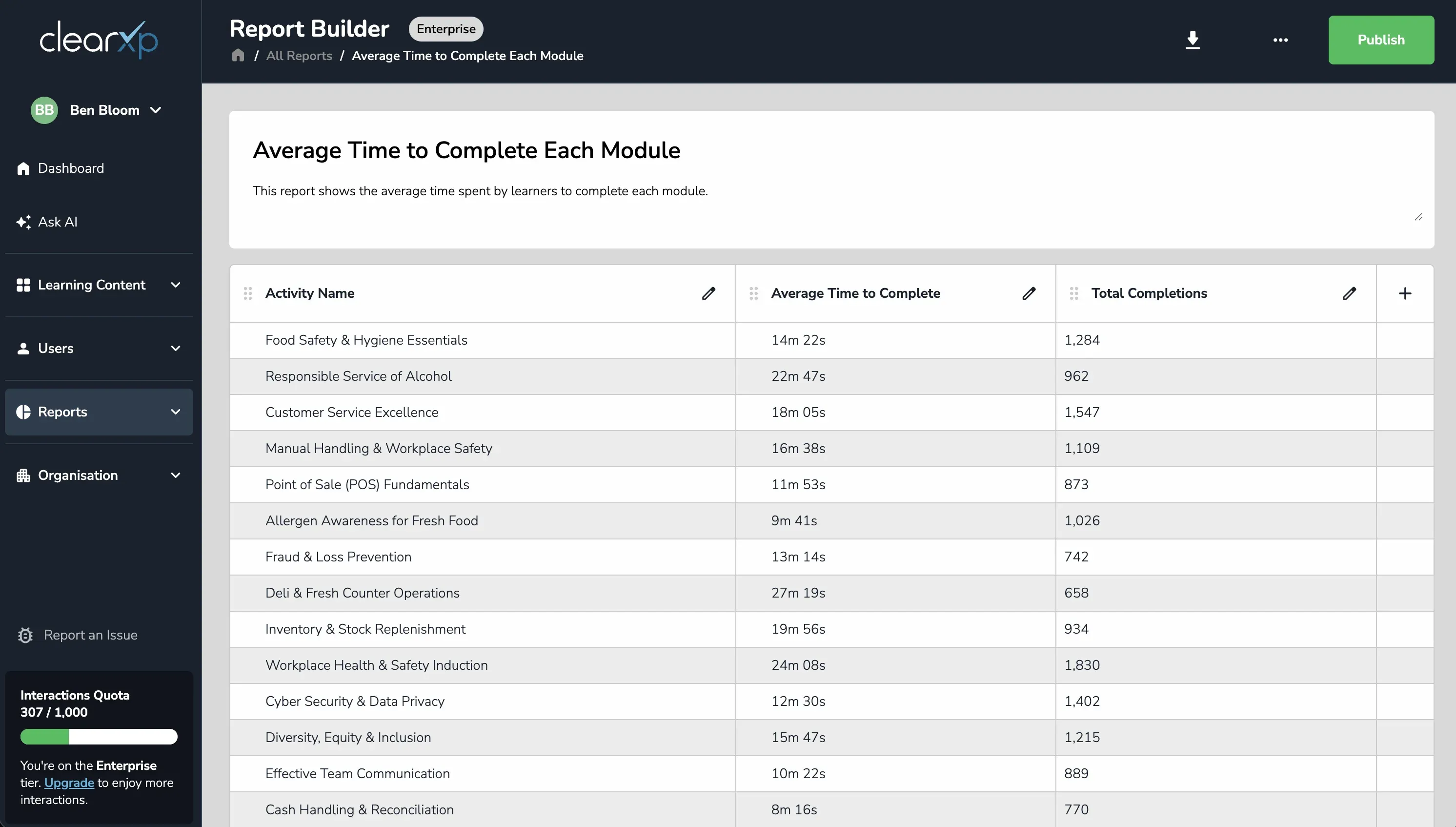
Enhancements
Section titled “Enhancements”Reporting
The new Report Builder took big strides this month:
- You can now publish reports, save them as reusable custom templates, and edit a report’s name and description.
- Large reports now stream their results with a progress bar, preventing timeouts.
- Reports can now be scheduled as to run at a certain time and frequency.
Mobile App
- Added GPS speed tracking so the app can be automatically disabled when a configured speed threshold is exceeded.
Activities
- Added prerequisite completion checks when launching events and sessions.
- Exposed a new activated date and a New Attempt setting on activities.
Content Authoring
- Exposer version history including the ability to preview any previous change and rollback if necessary.
- The attachments component now also pulls in prerequisites from a parent activity.
- Fixed video duration being calculated incorrectly when playback was skipped..
2025/09/22
Section titled “2025/09/22”Enhancements
Section titled “Enhancements”Learning Hub
- The Hub now supports SMS one-time-password (OTP) as a sign-in method, with a configurable expiry timeout.
- Improved how duplicate email addresses are resolved when sending notifications.
- Fixed location placeholders not showing up in notifications when venue and room are reversed.
2025/08/19
Section titled “2025/08/19”Enhancements
Section titled “Enhancements”Admin
- Added semantic content search ingestion for Word (
.docx) documents and Adapt modules, expanding what AI-powered search can find.
Content Authoring
- Added a new Feedback quiz type for collecting rating-based feedback, plus support for label and timestamp filters.
- Fixed activity search not working correctly on mobile screens.
- Fixed sign-out in the mobile app.
- Fixed several bulk-upload issues, including session labelling under events as well as full schema validation.
- Filtered deactivated activities from task counts.
2025/06/12
Section titled “2025/06/12”
ClearXP is now SOC 2 Type 2 Certified
We’re proud to announce that ClearXP has achieved SOC 2 Type 2 certification. Building on the Type 1 certification we achieved earlier in the year, Type 2 independently verifies that our security controls have operated effectively over an extended period of time — covering areas like logical and physical access, incident and change management, data backup, and disaster recovery.
This certification is the result of an independent external audit against the AICPA’s Trust Services Criteria for Security, Availability, and Confidentiality. It reflects our ongoing commitment to safeguarding your data and providing a secure, reliable service you can trust.
Learn more at our Trust Center.
2025/06/25
Section titled “2025/06/25”Enhancements
Section titled “Enhancements”New Report Builder
We began rolling out a completely rebuilt Report Builder, with support for adding and removing columns, filtering, grouping and exporting — backed by a brand-new, faster reporting engine connected to our state-of-the-art data warehouse.
Content Authoring
- The chart component can now take attributes to feed in as report filters, and pathways support a locked status.
- Added date filter options to the performance assessment template.
- Improved task-digest emails (formatting, plus new digest-type and tasks-per-section options) and de-duplicated digest entries.
- Fixed assessor free-text responses not being captured in reports.
2025/05/27
Section titled “2025/05/27”Enhancements
Section titled “Enhancements”Admin Beta
- Our new admin exeprience now includes an Engagement, Assessment and Quality dashboards for detailed analytics reporting.
- Added multi-session, multi-client authentication, so users can hold several multiple sessions across different realms/organisations.
Storyboards
- New regeneration options including history so you can go back to previous versions.
- Storyboards can now be exported as PDF.
DocuSign
- Rolled out a number of improvements to our DocuSign integration, including a styled completion page and new display-format options in authoring.
- Fixed an OAuth SSO infinite-redirect loop.
- Fixed Power BI report links breaking after migrating our internal storage engine.
- Fixed blank activities appearing on Mananger Dashboards.
2025/04/29
Section titled “2025/04/29”Enhancements
Section titled “Enhancements”Admin
- Added an AI chatbot assistant to the Admin experience that can answer simple knowledge base questions.
Self-Serve Reporting
- Added custom date filters, monthly schedules, report descriptions, new enrolment filter options and human-readable descriptions on dashboard reports.
- Migrated scheduled reports to use more secure, expiring download links.
Content Authoring
- Added markdown support to tooltip popups and the ability to build lookups that reference other custom values or formulas.
- Fixed date parsing for certain formats on bulk import.
- Fixed an issue when archiving user groups.
2025/03/27
Section titled “2025/03/27”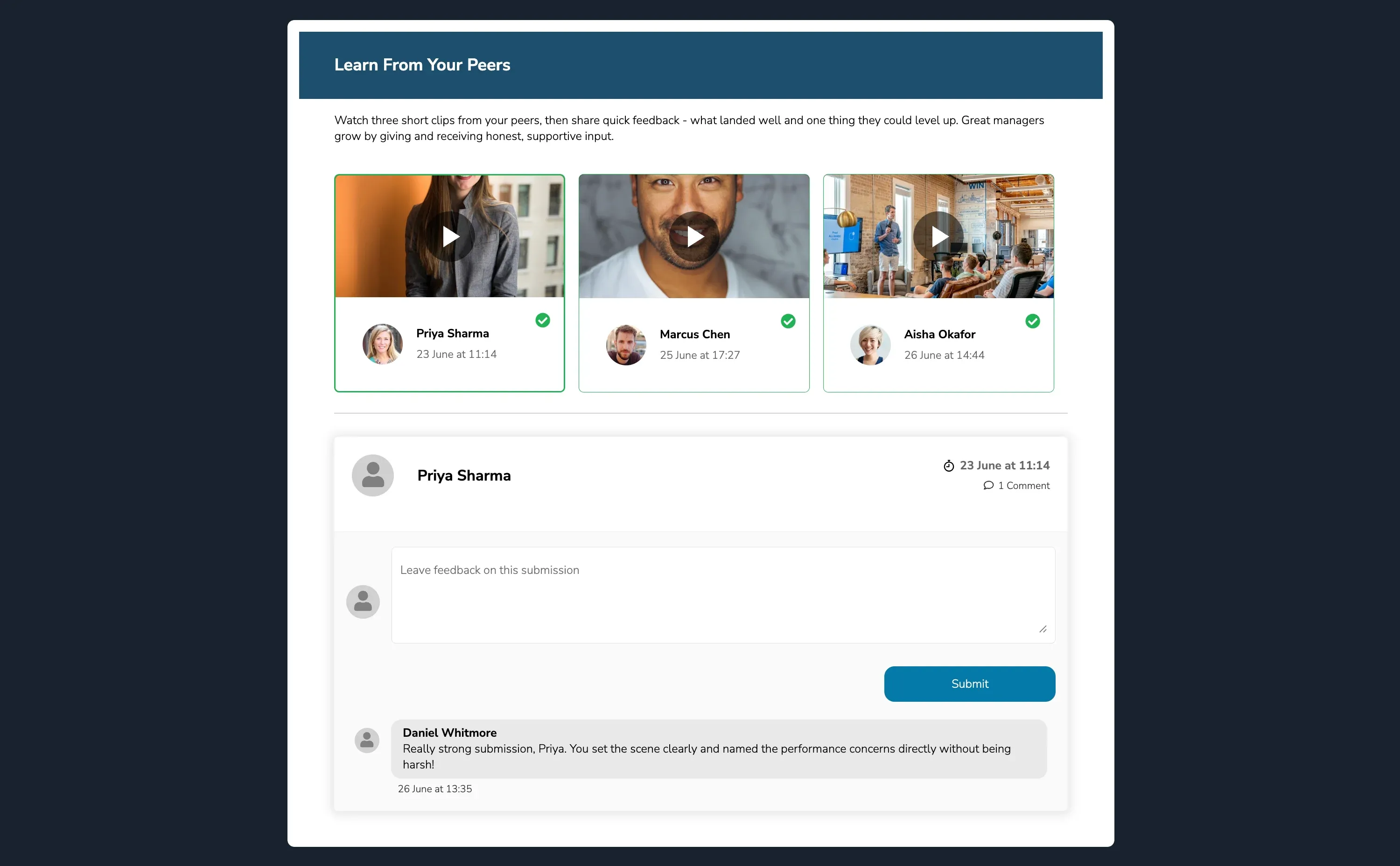
Enhancements
Section titled “Enhancements”Video Assessments
- Released a new Video Upload component so learners can record themselves demonstrating a task or skill and submit as part of a video assessment.
- This ties into a new Peer Feedback component that will automatically assign users from the same cohort to view and leave feedback on a video submission.
Workflows
- Workflow actions can now be configured to complete other activities (not just the current one).
- The Assign Task action now supports re-assignment and will clear the previously assigned assessor.
- Notifications now support activiites as recipients, which means you can send reminders to a generic location-based email.
DocuSign
- Enabled third-party authentication for the DocuSign integration, with handling for expired envelopes.
2025/02/20
Section titled “2025/02/20”
ClearXP is now SOC 2 Type 1 Certified
We’ve achieved SOC 2 Type 1 compliance – this means we’ve implemented security controls to protect your data, covering areas like logical and physical access, incident and change management, data backup, and disaster recovery.
These controls adhere to the AICPA’s Trust Services Criteria for Security, Availability, and Confidentiality. Our SOC 2 Type 1 compliance proves our dedication to safeguarding your data and ensuring top-notch security and availability for our services. You can trust us to keep your data safe and sound. We’re also well on our way to achieving Type 2 compliance.
Learn more at our Trust Center.
2025/02/13
Section titled “2025/02/13”Enhancements
Section titled “Enhancements”Data Explorer
We’ve made a couple small enhancements to the Data Explorer screen:
- It’s now possible to only include activities in a report that contain a specific tag.
- Tags hav now also been exposed in the activity search to make it easier to identify activities with a similar name.
- We found the performance of admin content search had been impacted by recent database upgrades and implemented a fix to restore search performance.
- Fixed launching of assets due to some internal authentication changes.
2025/02/06
Section titled “2025/02/06”Enhancements
Section titled “Enhancements”Report Builder
We’ve dedicated a lot of time to overhauling our Report Builder to simplify report creation and make it easier to build custom dashboards.
- A comprehensive new library of templates to cover a wide range of use cases from compliance, engagement and more.
- All report templates now include out-of-the-box visualisations to better portray your data. Visualisations will also update automatically as you filter or edit the reports.
- Our report builder now supports video analytics queries, including drop-off rates and amount of video watched over time.
- Fixed activity launch for in-built templates not working after the Display Mode option had been changed.
- Fixed processing of notifications when the message field had been left empty.
2025/01/23
Section titled “2025/01/23”Enhancements
Section titled “Enhancements”Content Search
We’re excited to announce that our authoring tool has upgraded content search capabilities. You can now include a search that dives deep into all modules within a program, finding semantically similar matches and even showing a text preview of matching content.
- Fixed dark theme not working correctly in legacy admin screens.
- We discovered and fixed an intermittent loading issue with SCORM modules that embed the Vimeo player which was resulting in a white screen.
- Fixed an issue where certain changes to the Visibility Filters setting could cause an invalid configuration that breaks the Learning Hub search.
2025/01/09
Section titled “2025/01/09”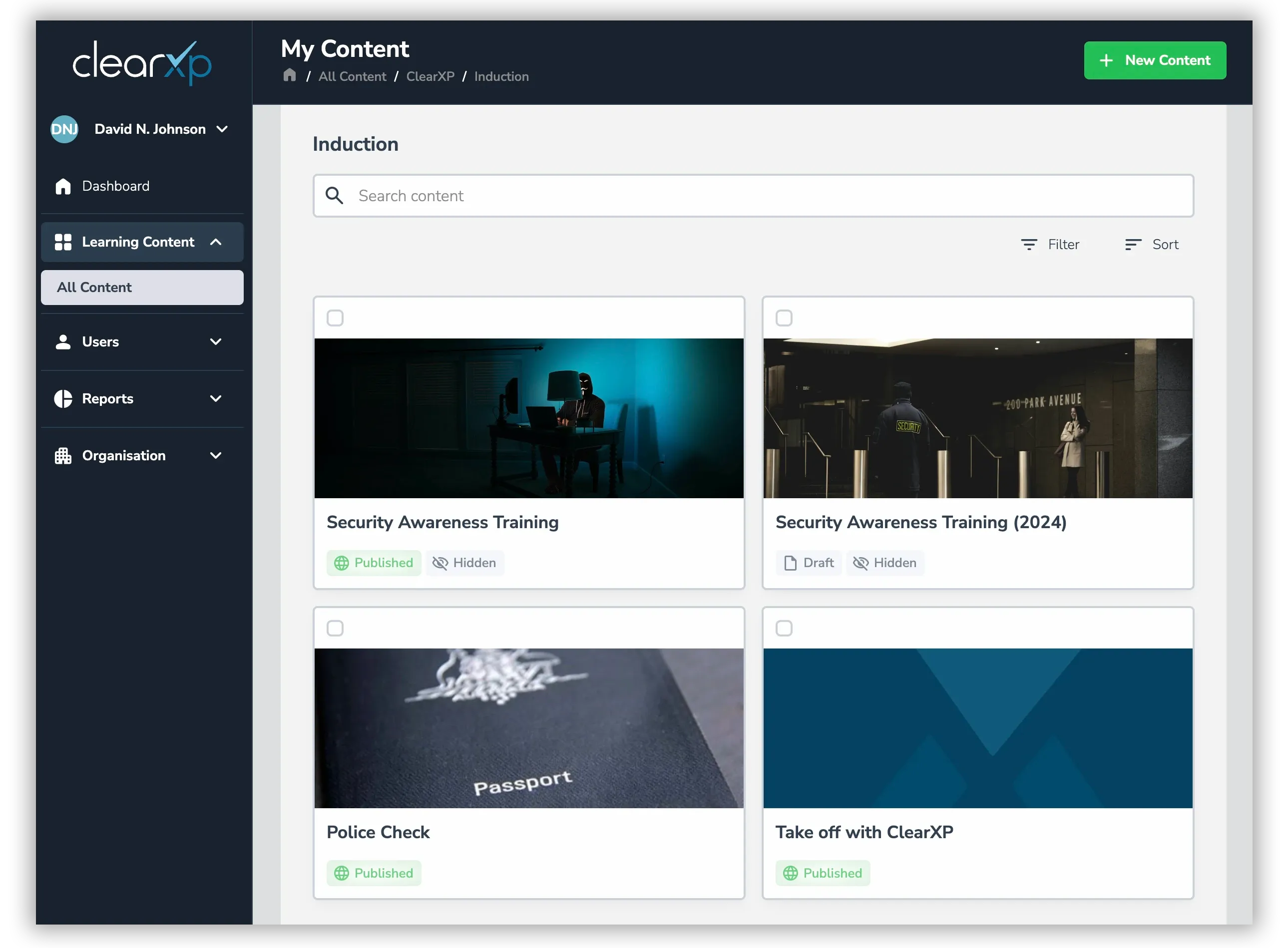
Enhancements
Section titled “Enhancements”Admin Beta Release
Over the past 6 months, we’ve been hard at work redeveloping our admin portal to make it easier to use. We’ve just released a beta version so you can start to get some of the benefits of our new user interface right away. This includes:
- Improved content search with results prioritised by importance, making it easier to find the content that’s meaningful to you.
- Improved attribute filtering, label navigation and assignment.
- Collaborative editing of attributes.
- Full light and dark mode support.
Assessment Analytics
- We’ve drastically improved the performance of the Assessment Analytics screen, especially on modules with large volumes of responses.
- We’ve also added an Export button for downloading the assessment results to an Excel or CSV file.